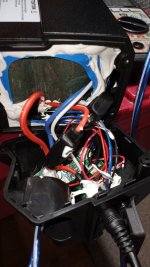
Reention Dorado 48v 17.5AH - BMS Help needed

Kriis

Member
Region
United Kingdom
Hi All
I managed to find a second one of these at a reasonable price with a failed BMS. All cells check out well and case/plugs/ancilliaries all useful but struggling to find a new BMS.
Not only this, but it appears that my wiring is unusual in that i have a stout wire coming direct from positive on end cell to the original board, whereas all boards i can find all use Negative for all 3 main connections, i.e. B-/P-/C-.
I'm reluctant to unwrap the cell pack just to run a new negative, and there's precious little room in the case to run internally (and safely).
I hope anyone who's worked on these, reads this - Thank you in advance.
 
Last edited:
The replacement BMS doesn't need to be an exact match as long as the specs are the same and it physically fits in the case. There's hardware out there that's only available to manufacturers so it may not be easy to track down.
There are places that rebuild batteries... have you tried contacting some of them for a compatible replacement?
 
...I hope that anyone who's worked on these reads this - Thank you in advance...
 
When you get a new BMS, you will wire it to the cells per the requirements of the new BMS.

Copying over the old wires to a different BMS can cause trouble if they are not the thing. Sometimes, they skip the first balance wire. They may reverse the order of the wires.

WHen selecting a BMS ---
1. Make sure it is a balance BMS. The specification will list the balance current.
2, SIze the current to tha capacity of the battery. You dont put a 30A BMS on a battery that can only handle 20A.
3. If your battery uses an on/pff switch, buy a BMS that supports an on/off switch, A teempeture switch is a good idea too,
4. Pay decent money. I exoect to pat $25USD (20£) or more.
 
Hi All
I managed to find a second one of these at a reasonable price with a failed BMS. All cells check out well and case/plugs/ancilliaries all useful but struggling to find a new BMS.

Can you post some pictures of your BMS?

I've got three Reention Dorado batteries, and I've removed the end caps on all of them, but didn't want to try and remove the cell pack to check out the BMS.

One of my batteries is a proprietary Das-Kit battery that may have that unusual wiring as well?


And,.. you might be able to find a part number or code printed on your BMS that you can enter in a search to find an exact replacement.
 

Attachments

  • 20230414_090116.jpg
    20230414_090116.jpg
    181.8 KB · Views: 59
Hi All
I managed to find a second one of these at a reasonable price with a failed BMS. All cells check out well and case/plugs/ancilliaries all useful but struggling to find a new BMS.
Not only this, but it appears that my wiring is unusual in that i have a stout wire coming direct from positive on end cell to the original board, whereas all boards i can find all use Negative for all 3 main connections, i.e. B-/P-/C-.
I'm reluctant to unwrap the cell pack just to run a new negative, and there's precious little room in the case to run internally (and safely).
I hope anyone who's worked on these, reads this - Thank you in advance.
Yeah, those Dorado cases are incredibly cramped. The issue is that most generic BMS units use low-side switching (negative), while the original setup you've got there is different. If you can't find an exact Reention replacement, you're pretty much forced to rewire for a common negative BMS, but like you said, safety and space are the biggest risks there.
 
Can you post some pictures of your BMS?

I've got three Reention Dorado batteries, and I've removed the end caps on all of them, but didn't want to try and remove the cell pack to check out the BMS.

One of my batteries is a proprietary Das-Kit battery that may have that unusual wiring as well?


And,.. you might be able to find a part number or code printed on your BMS that you can enter in a search to find an exact replacement.
Thank you for your reply, it's helpful to know i'm possibly not the only one. I did try and track down the BMS part number but with no luck. It is a mystery because looking at the nomenclature on the original BMS, all 3 connections are clearly marked "-" (minus) and so i obviously copied this initially before looking at several wiring diagrams which didn't tally with my battery wiring. I will post some pictures of the original BMS soon.
 
Yeah, those Dorado cases are incredibly cramped. The issue is that most generic BMS units use low-side switching (negative), while the original setup you've got there is different. If you can't find an exact Reention replacement, you're pretty much forced to rewire for a common negative BMS, but like you said, safety and space are the biggest risks there.
I'm sure you are right, although it's a mystery as to how the original BMS ever worked (as explained in last post) with all 3 connections showing "minus" on the board, i now need to re-wire my battery connection according to the majority of diagrams i've looked at, in the hope that this will work.
 
Did you trace out the wires from the BMS to the cells?
I wouldn't go by the BMS markings alone.
 
Thank you for your reply, it's helpful to know i'm possibly not the only one.

I don't know if this is relevant, but my Das-Kit hub drive ebike uses a throttle for a mid-drive which has the positive and negative reversed kinda like what you found with your BMS.

You might have a proprietary BMS that might be difficult to find?


Can you post some pictures of your BMS?

I've got three Reention Dorado batteries, and I've removed the end caps on all of them, but didn't want to try and remove the cell pack to check out the BMS.

One of my batteries is a proprietary Das-Kit battery that may have that unusual wiring as well?


And,.. you might be able to find a part number or code printed on your BMS that you can enter in a search to find an exact replacement.
I am struggling to send single pictures to my PC (which is my only connection with EBR at the moment) but i will try and login on phone in the future. I still haven't solved the main mystery - i.e :- why my BMS is connected to the POSITIVE end of the ganged battery pack (all my studying of conventional BMS wiring indicates that the 3 main connections are to Negatives) but also how the hell it worked because the original Reention BMS that came with the battery also indicated only negative connections on the circuit board, something that failed to dawn on me while i was removing.
Not having a good experience at the moment as it looks as though my 2nd controller has just failed. I got caught in the rain two days ago but managed to cycle home around 10 miles with no indication of a problem until i looked today to find the voltage display indicating virtually nothing (3 volts) despite a confirmed fully charged battery that would normally show around 41 volts. After hours of fault-finding by swapping each item and cleaning all relevant connectors, a controller fail is the only thing that makes sense. The inability to confirm this, only got compounded when i went to use the old controller to see if it would shed any more light. Well, it really didn't because it showed IDENTICAL behaviour despite me thinking (memory wise) that originally it only partially failed originally due to an inability to pick-up/accelerate smoothly (the swap to the new one eliminated the problem immediately). Talk about a head-scratcher. I can only assume that this is the most common fail that happens to controllers despite me covering over 4,000 miles with little to no problems at all. It has me baffled and am loathe to order a new one because of such an unusual coincidence, but i truly have tried everything, and the only component i can't vouch for is the controller...


Succesfully transferred pictures to PC.. but "Files too big" to include on here..
 
Last edited:
. I got caught in the rain two days ago but managed to cycle home around 10 miles with no indication of a problem until i looked today to find the voltage display indicating virtually nothing (3 volts) despite a confirmed fully charged battery that would normally show around 41 volts.

Is your battery actually drained (3 volts) or is your display reading wrong?

Did you come home and charge your battery, then find it had later drained to 3 volts after sitting?


Perhaps water got inside your battery and it shorted out the little circuit boards inside the end cap ??

My Das-kit battery will go to sleep after a few minutes and I have to press the power button on the battery to wake it up.

That suggests to me that there is always power going to the circuit board and it could have drained your battery?

See if you can charge your battery with it removed from your ebike and if it will hold a charge.

That should help determine if it's your BMS or your controller that's draining the battery.
 
Thanks for your reply, it's definitely the Controller having swapped everything but this* - the mystery is that both controllers (ultimately) failed in the same manner.


*could not have been more thorough - 3 different batteries/brand new display/brand new "4 into 1" front wiring. Fault shows with both PAS and rear hub motor disconnected - BMS has done it's job. The common "fail" symptom is that the display turns on automatically as soon as power plugged in. I even changed the short powerlead where you locate the battery plug just to rule it out.
 
Last edited:
Back