Rear Wheel Removal Tip

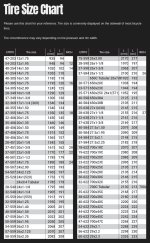
All you need is a piece of chalk, a yardstick, and a sidewalk. Put the valve down. Mark that spot with chalk on the sidewalk. then roll forward until the valve is straight down again. Mark that spot. Measure between the marks. That is the circumference. This week I am taking a 700c rim and making it a 29'er by puting 50mm tires on it. Using a yardstick it will be 29 inches from the ground to the top of the tire. It will be 622-50 or 700c-2".
 
Great suggestion. Thanks. Maybe because it is cold out there this evening but with a fully charged battery an PAS level of 5 in 8th gear I was getting 28-30mph with not problem but this evening 25 was all I could do with PAS 5, 8th gear and slightly downhill (the garman and the bikes display are tracking now).
 
I do not understand how they all have a 29” diameter.

It's the height of the sidewalls that add to the overall diameter of the wheel.

And keep in mind that tire sizing is a bunch of nonsense. Lol
A 26" fat tire and wheel has a much smaller rim diameter than a normal 26" mountain bike.

Some controllers allow you to enter the actual tire size printed on the tire, but my three different controllers asked for the overall diameter of the wheel.
 
Thanks PCeBiker. That certainly clears things up a bit :)
Also, I only charged to 49 volt DC because it was getting dark and I wanted to test ride it. Probably should have waited unit full charge.
 
Thanks PCeBiker. That certainly clears things up a bit :)
Also, I only charged to 49 volt DC because it was getting dark and I wanted to test ride it. Probably should have waited unit full charge.

I deleted my post thinking that your battery was fully charged, but did you do a Garmin speedometer test on your old tires?

Perhaps they weren't calibrated properly which could also affect your speed reading of your new tires.
 
I understand diameter and circumference but sketchy on actual wheel diameter and outer tire diameter as to which one the are setting wheel size on the display for the wheel size. I do not understand using 26” as wheel size if the diameter of the tire is larger. That affects the speed just as it would by putting taller tires on a car. Come to think of it. This tire is not setting any closer to the front fender than the old one that I can tell.
Who knows what logic your controller is using, if any... Sounds like a dart board
Most of what I've seen you just enter the correct tire size
Screenshot_20251214_193901_Speeed.jpg
 
All you need is a piece of chalk, a yardstick, and a sidewalk. Put the valve down. Mark that spot with chalk on the sidewalk. then roll forward until the valve is straight down again. Mark that spot. Measure between the marks. That is the circumference. This week I am taking a 700c rim and making it a 29'er by puting 50mm tires on it. Using a yardstick it will be 29 inches from the ground to the top of the tire. It will be 622-50 or 700c-2".
That only works if the controller has that granular of a tire size input. I don't think that's the situation here.
 
I deleted my post thinking that your battery was fully charged, but did you do a Garmin speedometer test on your old tires?

Perhaps they weren't calibrated properly which could also affect your speed reading of your new tires.
Yes, it was right on with their setting of 29” wheel setting. Now I had to go to 27” wheel setting and now close to the Garmin. I am so tired I cannot rationalize the setting going lower with new tires as to why? Maybe tomorrow after I get some rest my brain with revert from it’s present Jelly like to normal 😁
 
That only works if the controller has that granular of a tire size input. I don't think that's the situation here.
My does it in .5 increments. (i .e. 27, 27.5, 28, 28.5 and the low value is 14“ and high value of 30”). I assume that is what you mean by granular but really granular would be in .1 increments.
 
Back