You are using an out of date browser. It may not display this or other websites correctly.
You should upgrade or use an alternative browser.
You should upgrade or use an alternative browser.
bafang 750 watt hub motor
- Thread starter cmugler
- Start date



tomjasz
Well-Known Member
- Region
- USA
- City
- Minnesnowta
The motors are fitted to the width of the dropouts front typically 110mm and rear 135mm. No relationship with the wheel or tire size. Fat bikes will have wider dropouts.does bafang make a 750 watt hub motor designed to be laced with a 27.5 wheel for a 2.8 tire
AHicks
Well-Known Member
- Region
- USA
- City
- Snow Bird - Summer S.E. Michigan, Winter Gulf Coast North Central Fl.
Timpo-
I know you posted a link showing a 135mm Bafang 750, but I spent an hour looking and never found anyone that would lace one to a wheel!
All of which is pretty weird as Juiced has been selling a 135mm 750 for years...
Laced to a 27.5" rim for use with a 2.8" tire makes a great deal of sense here. A find like that could encourage me to do another build ....
I know you posted a link showing a 135mm Bafang 750, but I spent an hour looking and never found anyone that would lace one to a wheel!
Yes, Bafang makes one. They're rating it as a 750/1000w. Actually sourcing it is kind of a challenge. And trying to make any sense out of the motor rpms rating is nearly impossible.does bafang make a 750 watt hub motor designed to be laced with a 27.5 wheel for a 2.8 tire
All of which is pretty weird as Juiced has been selling a 135mm 750 for years...
Laced to a 27.5" rim for use with a 2.8" tire makes a great deal of sense here. A find like that could encourage me to do another build ....


AHicks
Well-Known Member
- Region
- USA
- City
- Snow Bird - Summer S.E. Michigan, Winter Gulf Coast North Central Fl.
I think this is a new motor. That's why there is so little info available for it. Nobody is using it yet, possibly because of it power rating. When you get legal, anything over 750w makes it off road only in the US.are there any e bikes with that motor you showed in the link?
The only other non fat 750 I can think of is the Juiced bike - which is a complete mystery to me.
I refuse to consider ANY GMAC option until they replace that huge display that should have been replaced years ago. -Al
AHicks
Well-Known Member
- Region
- USA
- City
- Snow Bird - Summer S.E. Michigan, Winter Gulf Coast North Central Fl.
I've been running a MAC 12t for 3 years now. That's a GREAT motor - IF - you can find one. I ran across this the other day, but no experience with them-
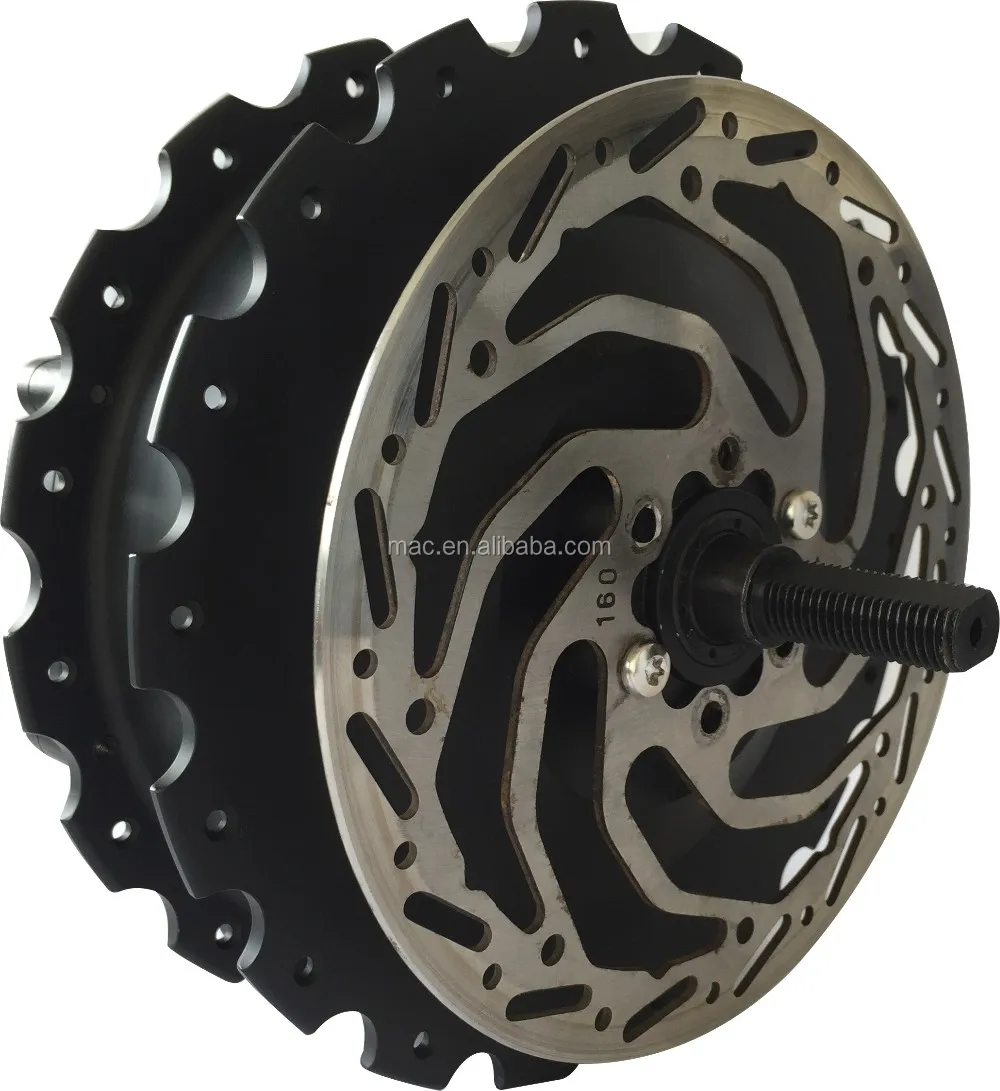
 www.alibaba.com
You WANT the 12t for the bigger wheels and tires, assuming your focus will be speeds under 20mph or so. Use the grin charts to see why. Grin SAYS the 10t will do anything the 12t will, but their charts don't support that...
Take whatever you can get, but you would also want the cartridge over a freewheel if given the choice. -Al
 ebikes.ca
Mac 1200w Hub Motor With New Stronger Composite Gears - Buy 1200w Hub Motor,1200w Hub Motor,1200w Hub Motor Product on Alibaba.com
Mac 1200w Hub Motor With New Stronger Composite Gears - Buy 1200w Hub Motor,1200w Hub Motor,1200w Hub Motor Product on Alibaba.com
You WANT the 12t for the bigger wheels and tires, assuming your focus will be speeds under 20mph or so. Use the grin charts to see why. Grin SAYS the 10t will do anything the 12t will, but their charts don't support that...
Take whatever you can get, but you would also want the cartridge over a freewheel if given the choice. -Al
Motor Simulator - Web Tools - Resources
Our ebike motor simulator lets you simulate and compare different ebike setups, including speed, power, efficiency, and heat, before you build. A wide selection of hub motors are modeled, and you can add custom batteries and controllers and set vehicle parameters like throttle level, bike...
ebikes.ca
tomjasz
Well-Known Member
- Region
- USA
- City
- Minnesnowta
That is the MAC motor factory. Typically they would sell a single motor as a “sample” then require a multiple motor order. I don’t remember the MOQ nor did I look for the number in your post. I’ve always found them easy to work with.I ran across this the other day, but no experience with them-


tomjasz
Well-Known Member
- Region
- USA
- City
- Minnesnowta
Yes, the one with all the useful data?that huge display
 Teasing my friend you've mentioned your disappointment before.
I'm not bothered at all.
In fact, I really dislike every Bafang BBSxx series display except the old C965. I still use a C961when I can.
None of which are pretty.
tomjasz
Well-Known Member
- Region
- USA
- City
- Minnesnowta
Argh. This fascination with a look rather than superior functionality is laughable. Which display offers anywhere near the useful data? While the EggRider is an attractive alternative it’s too small and for many more difficult to manage. I have lots of happy EggRider buyers but more than a few put off by the size a teething pain setting up. I use my CA3 and shunt to get real time power reading and data on my BBSxx builds. But as we see here YMMV.
AHicks
Well-Known Member
- Region
- USA
- City
- Snow Bird - Summer S.E. Michigan, Winter Gulf Coast North Central Fl.
I knew you were reaching for my chain..... I figure if I mention it enough, MAYBE the right somebody will get the message!Yes, the one with all the useful data?
I'm not bothered at all.
In fact, I really dislike every Bafang BBSxx series display except the old C965. I still use a C961when I can.
None of which are pretty.
Regarding "superior functionality", like you, willing to learn/adapt. Please tell me what else would need to be displayed, AFTER initialy setting up. Much more available, but this is what you'll be looking at most of the time. In other words, info at a glance.
Bafang (color):
Color KT:
VGEBY Bike LCD Instrument Bicycle KT-LCD8H Intelligent Colorful Screen LCD Conversion Instrument : Sports & Outdoors
VGEBY Bike LCD Instrument Bicycle KT-LCD8H Intelligent Colorful Screen LCD Conversion Instrument : Sports & Outdoors
www.amazon.com
KT LCD (mono) exact battery voltage available with 2 clicks
Amazon.com : CSCbike Ebike Display, KT-LCD3 Control Panel Display for Electric Bicycel 36V 48V 60V 72V Universal Support Electric Bike Converts Accessories(36/48V, Waterproof Plug) : Sports & Outdoors
Amazon.com : CSCbike Ebike Display, KT-LCD3 Control Panel Display for Electric Bicycel 36V 48V 60V 72V Universal Support Electric Bike Converts Accessories(36/48V, Waterproof Plug) : Sports & Outdoors
www.amazon.com
All 3 of these are compact displays, measuring about 2.5 x 4" (+/-)
Egg Rider - and let's keep it simple. I don't even own a smart phone
Nice, though a little compact, display -about 2x3". There could be some setup issues.

Grin CA-3
Granted, to fully utilize it's capabilities, a degree in electrical engineering would be nice. WAY over the top for most of us. If you look at the pictures it should be pretty easy to see. 2 lines of data, really? I couldn't find the actual dimensions, so big will have to suffice...
Cycle Analyst V3 - Grin Products - Product Info
The Cycle Analyst V3 is Grin's all-in-one ebike display and control console: track volts, amps, speed and range, and add PAS, torque sensing, and power limits.
ebikes.ca
I do admit that my preferences may not be shared by all, but it should not take much to see the CA-3 DISPLAY is clearly/badly outdated as compared to others that are available. It needs updating badly to match the quality of the display up with it's capabilities. -Al
tomjasz
Well-Known Member
- Region
- USA
- City
- Minnesnowta
I’m one of the dullest bulbs here. Me thinks you do protest to much. You post and help fellas here we’ll beyond the difficulties of a CA3. But we’ll agree to disagree. The CA3 is a support staff dream. For me.WAY over the top for most of us.
thanks for the discussion. I value your input even when we have different views and experience.
TD
tomjasz
Well-Known Member
- Region
- USA
- City
- Minnesnowta
Perfect for a gadgeteer from the 50’s.a gadget from 1970s or 1980s.

AHicks
Well-Known Member
- Region
- USA
- City
- Snow Bird - Summer S.E. Michigan, Winter Gulf Coast North Central Fl.
Grin's motor simulator spreadsheet is an absolutely fabulous tool for answering questions like this, or even playing "what if" with any other ideas. It's incredibly accurate when predicting anything you would want to know. Take some time and play with it/get to know it. Plug some stuff in and hit "simulate", and poof, there's your answer-is grin's gmac hub more powerful than their ezee hub or more efficient (running on 48 volts)
As can be seen in the link, the motors you are thinking of are virtually identical, all else being the same -
Motor Simulator - Web Tools - Resources
Our ebike motor simulator lets you simulate and compare different ebike setups, including speed, power, efficiency, and heat, before you build. A wide selection of hub motors are modeled, and you can add custom batteries and controllers and set vehicle parameters like throttle level, bike...
ebikes.ca
AHicks
Well-Known Member
- Region
- USA
- City
- Snow Bird - Summer S.E. Michigan, Winter Gulf Coast North Central Fl.
The GMAC, when set up as directed, has "variable" regen that works much like your throttle in reverse. My understanding is it's plenty capable of locking up the rear wheel, even at speeds of less than 10mph. It's the combination of the hardware AND software that makes it a game changer.so with the GMAC does the regenerative breaking function like on an electric car where when going down a long steep hill you may still need to apply throttle to maintain sufficient speed but the battery is still receiving juice
tomjasz
Well-Known Member
- Region
- USA
- City
- Minnesnowta
Different, not superior. EeZee are very well made and a top notch GD hub. Every rider will not put the GMAC to its best use. TheGMAC was superior in every aspect except
TDCM IGH Kit is another great design. All have their place. My eezee build was a pleasantly pleasing build. Top tier quality and reliability. Only a BMC might exceed the build quality.
Similar threads

- Replies
- 42
- Views
- 9K


- Replies
- 10
- Views
- 1K

- Replies
- 254
- Views
- 28K

- Replies
- 13
- Views
- 9K


- Replies
- 17
- Views
- 2K