Okay thanks, I called my LBS and they have the cassette I need. I’ll try that.I believe that you can remove the Cog and install an 11 speed cassette.
You are using an out of date browser. It may not display this or other websites correctly.
You should upgrade or use an alternative browser.
You should upgrade or use an alternative browser.
Wahoo Kickr Core 2 with Zwift
- Thread starter Extreme1
- Start date


If I do this process, will it add the 2.4 ghz that I need to my 5g ? I don’t want to disconnect from 5g, I just want to add to 2.4 somehow.You'll need it to run Zwift on a computer.
I found this from a Ring support channel. It describes how to set up the 2.4GHz radio in the ATT Air.
- Using your phone take a photo of the sticker on the back of your Att Air Router to easily reference the info you will need, then open your browser on a computer.
- Using the info from the sticker, in the search bar type in the router IP address. It starts with: http:// Your browser may get upset and say you are about to enter an unsafe website, ignore that and continue to the IP address website.
- There should be a darker blue bar across the top of the page. Click on “Home Network”.
- Then click on “Wi-Fi”
- Using the info from the sticker, type in the “Device Access Code”.
- At the end of the first section titled “Wi-Fi”, Look for “Advanced Options” and click on it.
- Go to “2.4 GHz Wi-Fi Radio Configuration”, find “Wi-Fi Operation”. If it is turned off, turn it on.
- Then go down to “Channel”. The Following info is copied & pasted directly from the Ring Support Site: “Change your wifi channel to 1, 6, or 11. These are usually the least crowded channels. If your router is already broadcasting on channel 1, 6, or 11, change the channel to one of the others.” Change the channel as directed.
- Scroll down to the bottom of the page and click “Save”.
- Wait about 5 min for your Wi-Fi to adjust the new settings. It will disconnect from all of your already connected devices and then automatically reconnect after a few minutes.
- Now when you try to connect to a Ring device (or in my case a Wi-Fi enabled pool pump as well), your Wi-Fi network should show up!
- Hope this helps & Good Luck!
I have 7 devices around the house that are all connected to the 5g and I don’t want to mess those up. It was a nightmare getting everything updated and connected when I changed over to the new ATT Air router.
Last edited:

stompandgo
Well-Known Member
- Region
- USA
I think you said that the 5GHz light was on, but the 2.4GHz light was off on your gateway. If so, this should turn it on and your Kickr should find your SSID.

RunForTheHills
Well-Known Member
- Region
- USA
There are a couple of ways to enable 2.4GHz on a router. You can enable it for your existing SSID, in which case a client may connect on either band, but you may not be able to control at which band the client connects. This could result in slower WiFi performance for some clients. Or you could enable 2.4GHz on a separate SSID like MySSID-2.4.If I do this process, will it add the 2.4 ghz that I need to my 5g ? I don’t want to disconnect from 5g, I just want to add to 2.4 somehow.
I have 7 devices around the house that are all connected to the 5g and I don’t want to mess those up. It was a nightmare getting everything updated and connected when I changed over to the new ATT Air router.
There is a feature called band steering where an AP may attempt to force a device that supports both 2.4 and 5 GHz to use 5GHz, but the feature can sometimes cause 2.4GHz only devices to fail to connect. So it is recommended to disable that if you have a mixed environment. 5GHz has a shorter range and less ability to propagate through walls and stuff. So sometimes the 2.4GHz signal will be stronger and a client will prefer it.
FWIW, I am using a six year old laptop right now. I have both bands enabled and my laptop reliably connects at 5GHz.


stompandgo
Well-Known Member
- Region
- USA
Did it work? We get so many drive-by's here.
I haven't had a chance to try that yet.Did it work? We get so many drive-by's here.
My WiFi went down yesterday (not related to what you suggested) and after two calls to ATT, one of them 2 1/2 hours long, I woke up today and the WiFi is working again.
Im going to call Wahoo Customer Support on Monday or Tuesday when they are open and see if they are any help. Also talked to the bike shop about getting an 11 gear cluster and change out that orange hub. I’m really looking for a trainer that I can just get on for a half hour and put in a few miles. I thought the setup and use of this trainer would be simple, guess not.
Once I get it working with the new gear cluster on it, I may get more involved with the video watching part. The two supplied Wahoo shifters seem kinda dumb to me. So far I’m not impressed with this trainer and I would not recommend it.
stompandgo
Well-Known Member
- Region
- USA
Your mechanical issues are related to the fact that you bought the wrong version of the Core 2, the one that's designed for Zwift and ERG use only. There is still a version sold that comes with a cassette instead of the Cog. Can you return yours for the other version?
I’ll have to check with the LBS that I bought it at and see if they will exchange it.Your mechanical issues are related to the fact that you bought the wrong version of the Core 2, the one that's designed for Zwift and ERG use only. There is still a version sold that comes with a cassette instead of the Cog. Can you return yours for the other version?
Can I just have them remove that orange hub, install the 11 speed gear cluster and have it work the same as the other version of the Core 2? Will I be able to use the gear shifter on the bike and it act like it does on an actual road ride?
If so, how sure are you that the pedaling will be easier in a lower gear on that new gear cluster? The guy at the LBS said it will work, but I’m very skeptical. I don’t mind buying the new cluster because the one that came on the other model Core 2 had the incorrect cluster for my Creo 1 on it and I would have to buy a new one anyways.
Last edited:
RunForTheHills
Well-Known Member
- Region
- USA
Honestly, if you are planning to use it with Zwift anyway I would give it a try with the Zwift Click before replacing the cog with a cassette. It looks pretty cool and Zwift is a fun way to ride indoors. The Apple TV and Zwift app makes it easy to turn on Zwift before you ride.
MTA: It looks like because Apple TV has a two bluetooth device limit, you have to use the phone app with it to control the Zwift Click. So the setup might be a little more complicated with Apple TV than with a computer.
MTA: It looks like because Apple TV has a two bluetooth device limit, you have to use the phone app with it to control the Zwift Click. So the setup might be a little more complicated with Apple TV than with a computer.
stompandgo
Well-Known Member
- Region
- USA
If your Creo has an 11 speed drivetrain, then the swap should be at no added cost to you. If you have a 10 speed or 12 speed drivetrain, you would have to change the cassette anyway, so swapping off the Cog for a cassette is an option. Unless you want to ride 100% on Zwift at $19.99/month, then the Cog and the remotes are useless to you. With the cassette, your bike should ride just like it would on the road with the assist off. Never ride on a trainer with the assist on.I’ll have to check with the LBS that I bought it at and see if they will exchange it.
Can I just have them remove that orange hub, install the 11 speed gear cluster and have it work the same as the other version of the Core 2? Will I be able to use the gear shifter on the bike and it act like it does on an actual road ride?
I'm 99.9% sure. Your problem is that you are stuck in a 14T cog on the rear. You cannot shift down to an easier gear unless the Cog and remotes are set up properly and you are on Zwift.If so, how sure are you that the pedaling will be easier in a lower gear on that new gear cluster? The guy at the LBS said it will work, but I’m very skeptical. I don’t mind buying the new cluster because the one that came on the other model Core 2 had the incorrect cluster for my Creo 1 on it and I would have to buy a new one anyways.
My Creo has the 11 speed drivetrain but the LBS said it would be $120 for the cassette that matches the one on my bike. At this point I don’t care, I just want to get it working so I can use the trainer. I’ll keep the cog and remotes for sometime in the future and may want to use them with Zwift. Again, the remotes seem dumb, for shifting maybe okay, but for steering too? Theres 4 buttons on each remote, I don’t want to deal with all that and batteries for the remotes, etc.If your Creo has an 11 speed drivetrain, then the swap should be at no added cost to you. If you have a 10 speed or 12 speed drivetrain, you would have to change the cassette anyway, so swapping off the Cog for a cassette is an option. Unless you want to ride 100% on Zwift at $19.99/month, then the Cog and the remotes are useless to you. With the cassette, your bike should ride just like it would on the road with the assist off. Never ride on a trainer with the assist on.
I'm 99.9% sure. Your problem is that you are stuck in a 14T cog on the rear. You cannot shift down to an easier gear unless the Cog and remotes are set up properly and you are on Zwift.
Okay, since you also think the pedaling will get easier once I can mechanically shift down, I’ll take the trainer to my LBS and have them install the new cassette.
RunForTheHills
Well-Known Member
- Region
- USA
You don't have to steer in Zwift. You can follow the preset course. However, you have the option to turn when you get to an intersection. The buttons allow you to do that without messing with your phone or computer keyboard while on the bike. They also give you shortcuts to some of the other Zwift functions like giving other riders a thumbs up. It is a multiplayer video game, after all. People from all over the world use Zwift and you will see them on the course. They also have group events.Again, the remotes seem dumb, for shifting maybe okay, but for steering too? Theres 4 buttons on each remote, I don’t want to deal with all that and batteries for the remotes, etc.
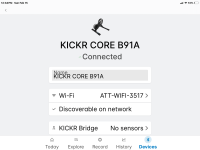
Okay that makes sense. I didn’t know that.You don't have to steer in Zwift. You can follow the preset course. However, you have the option to turn when you get to an intersection. The buttons allow you to do that without messing with your phone or computer keyboard while on the bike. They also give you shortcuts to some of the other Zwift functions like giving other riders a thumbs up. It is a multiplayer video game, after all. People from all over the world use Zwift and you will see them on the course. They also have group events.
UPDATE
The kid from my LBS came to my house and got me up and running. Got the Zwift Clicks connected too. I rode a couple short rides with Zwift and it’s all good now.
So never in a million years would I have been able to connect and link everything and get it running without the kid coming over and doing it for me. Best $100 I ever spent.
Thanks to everyone on this Forum that helped me.
The kid from my LBS came to my house and got me up and running. Got the Zwift Clicks connected too. I rode a couple short rides with Zwift and it’s all good now.
So never in a million years would I have been able to connect and link everything and get it running without the kid coming over and doing it for me. Best $100 I ever spent.
Thanks to everyone on this Forum that helped me.

Stefan Mikes
Gravel e-biker
- Region
- Europe
- City
- Mazovia, PL
So glad to hear it, Extreme! For me, a modern cycling trainer was a Tale Of Iron Wolf (as we say in Poland); your story has helped me understand how the thing works. Nice pedalling!
Just a question: You can certainly shift gears a do cornering with the remote. Can you brake? Any other functions available? Can you virtually crash on the bike?
P.S. A friend rides an older trainer. His question is: Can you ride the Wahoo Kickr Core 2 + COG without Zwift? (Another friend says you may not use Zwift if you turn the ERG mode on and connect a Wahoo ELEMNT cycling computer. Or, a Garmin Edge perhaps).
Just a question: You can certainly shift gears a do cornering with the remote. Can you brake? Any other functions available? Can you virtually crash on the bike?
P.S. A friend rides an older trainer. His question is: Can you ride the Wahoo Kickr Core 2 + COG without Zwift? (Another friend says you may not use Zwift if you turn the ERG mode on and connect a Wahoo ELEMNT cycling computer. Or, a Garmin Edge perhaps).
Last edited:
stompandgo
Well-Known Member
- Region
- USA
A customer bought a Wahoo Kickr Shift bike that he wanted to use with Rouvy. He built the bike but could not get it working. The shop sent me over there to figure everything out. He did not connect the wiring correctly, had an obsolete Apple TV box, and his wifi needed to be reconfigured. Sometimes, you just have to be there to finish the job. I had never seen a Wahoo Kickr Shift, and never configured an ATV box or Rouvy.UPDATE
The kid from my LBS came to my house and got me up and running. Got the Zwift Clicks connected too. I rode a couple short rides with Zwift and it’s all good now.
So never in a million years would I have been able to connect and link everything and get it running without the kid coming over and doing it for me. Best $100 I ever spent.
Thanks to everyone on this Forum that helped me.
Morning Stephan, it’s early here and just having my coffee.So glad to hear it, Extreme! For me, a modern cycling trainer was a Tale Of Iron Wolf (as we say in Poland); your story has helped me understand how the thing works. Nice pedalling!
Just a question: You can certainly shift gears a do cornering with the remote. Can you brake? Any other functions available? Can you virtually crash on the bike?
P.S. A friend rides an older trainer. His question is: Can you ride the Wahoo Kickr Core 2 + COG without Zwift? (Another friend says you may not use Zwift if you turn the ERG mode on and connect a Wahoo ELEMNT cycling computer. Or, a Garmin Edge perhaps).
You cannot brake and I’m not sure about other functions as Im just learning about Zwift. When the video is playing, the riders “ride through” you and you through them. The video isnt perfect. I don’t know about crashing yet lol.
As far as I know, if you have the Cog, it must be used through Zwift and the Clickers for it to shift the gears and the pedal resistance to be felt. If your friend used a cassette instead of the Cog, then it could be used without Zwift and apparently can be used through Swoosh or Rouvie. The kid from my LBS told me that, but I haven’t tried it. Also not sure about riding it through the Element bike computer.
For $20 a month membership to Zwift, it’s cheap enough for something to watch and interact with when I’m on the indoor trainer.
Yea I’m 63 y/o and I’m realizing that I’m not tech savvy at all. The kid from my LBS had my Ipad and his phone playing at the same time, watching videos and pressing buttons on my Clickers all at the same time. I wanted to see what he was doing in case I ever had connection problems, but I lost track because he was doing it so quickly.A customer bought a Wahoo Kickr Shift bike that he wanted to use with Rouvy. He built the bike but could not get it working. The shop sent me over there to figure everything out. He did not connect the wiring correctly, had an obsolete Apple TV box, and his wifi needed to be reconfigured. Sometimes, you just have to be there to finish the job. I had never seen a Wahoo Kickr Shift, and never configured an ATV box or Rouvy.
I feel like my 86 y/o Mother In Law, damn, what happened? Hahahaaha
Similar threads
- Replies
- 6
- Views
- 5K


- Replies
- 8
- Views
- 16K

