Bafang BBSxx series, Apple Mac access to programming!!

Please note that the Ultra controller uses the same programing software the BBSxx series uses. If it works on a BBSxx, it will work on an Ultra. That said, I know you don't mess with Ultra's, and never mentioned Ultra anywhere.

I did not know that the new production BBSxx series motors were still UART based. I thought when Bafang switched the Ultra's, they switched the BBSxx's as well?
But you’re snarky comments are ok?
 
He was given a time_out.
You're next if you guys can't play nice!
If you can find it within yourself, please don't fan the flames. That helps nothing....
For those with ANY interest, Tom WAS NOT given a 4 month time out.....
 
This is amazing, and it seems like it’s going to save me as an Apple user $120 on an Eggrider, (or at least a 6 pack to borrow someone’s Android phone!)

I’m about to order everything for my first build (BBS02) and have some extremely noob questions about how to use this:

- I plug the Bafang USB programing cable into the USB port on my laptop (and into the motor via the display cable)?

- Then click open serial port?

- I can save settings versions with Save? And load previous saved versions with load?

- Any idea if this works with mobile browsers? I’m reading that the Serial API isn’t supported by mobile browsers but it would be great to use this on the go.

Thanks for humoring these very basic questions, want to make sure i buy the right stuff, and don’t melt the motor before my first ride😂😂
 
If you can find it within yourself, please don't fan the flames. That helps nothing....
For those with ANY interest, Tom WAS NOT given a 4 month time out.....
But I was and this is my niche.

poke.gif
 

BafangWebConfig

Cross-platform browser based configuration tool for Bafang BBSxx e-bike motors, runs on Mac, Linux or Windows. It requires a browser with support for Web Serial API, and should work on any recent version of Chrome, Opera or Edge.

Run online​

Click here to start the tool.

Install & run locally​

Download or clone the repository and open BafangWebCfg.html in your browser.

Notes​

USE AT YOUR OWN RISK! Bad settings can fry your motor controller.

If you find any bugs, please report them here.

Thanks to Stefan Penov (https://penoff.me/2016/01/13/e-bike-conversion-software/) and Philipp Sandhaus (https://github.com/philippsandhaus/bafang-python) for their prior work on deciphering the original Bafang Config Tool source code and communication protocol.

BafangWebConfig

Cross-platform browser based configuration tool for Bafang BBSxx e-bike motors, runs on Mac, Linux or Windows. It requires a browser with support for Web Serial API, and should work on any recent version of Chrome, Opera or Edge.

Run online​

Click here to start the tool.

Install & run locally​

Download or clone the repository and open BafangWebCfg.html in your browser.

Notes​

USE AT YOUR OWN RISK! Bad settings can fry your motor controller.

If you find any bugs, please report them here.

Thanks to Stefan Penov (https://penoff.me/2016/01/13/e-bike-conversion-software/) and Philipp Sandhaus (https://github.com/philippsandhaus/bafang-python) for their prior work on deciphering the original Bafang Config Tool source code and communication protocol.
I registered to this forum just to post this, after reading the nitpickering that followed the initial post... so many thanks for this contribution, I've been using the Windows .exe for a couple years but got stuck after switching to an ARM-based MacBook. Your web config worked like a charm out the box, saved me endless headaches with mapping COM/USB ports through VirtualBox!

Franck
 
saved me endless headaches with mapping COM/USB ports through VirtualBox!
FWIW, I believe Parallels works well on the ARM-based Macs for Windows emulation. I personally still have the last Intel-based MBP on which Parallels works perfectly - I have two Windows only apps that use COM/USB ports to connect to hardware and assignment/use is quite straightforward.
 

BafangWebConfig

Cross-platform browser based configuration tool for Bafang BBSxx e-bike motors, runs on Mac, Linux or Windows. It requires a browser with support for Web Serial API, and should work on any recent version of Chrome, Opera or Edge.

Run online​

Click here to start the tool.

Install & run locally​

Download or clone the repository and open BafangWebCfg.html in your browser.

Notes​

USE AT YOUR OWN RISK! Bad settings can fry your motor controller.

If you find any bugs, please report them here.

Thanks to Stefan Penov (https://penoff.me/2016/01/13/e-bike-conversion-software/) and Philipp Sandhaus (https://github.com/philippsandhaus/bafang-python) for their prior work on deciphering the original Bafang Config Tool source code and communication protocol. The Bafang BBSxx series is a popular choice for e-bike enthusiasts looking for powerful and customizable motor systems. For those interested in programming these motors on a Mac, the use of ai in elearning is making it easier to access and understand complex configurations. With the right software and tools, Mac users can fine-tune performance settings for a smoother ride. If you're working on customization, be sure to check compatibility and available resources for a seamless programming experience.
The Bafang BBSxx series is a popular choice for e-bike enthusiasts looking for powerful and customizable motor systems.
 
This is amazing, and it seems like it’s going to save me as an Apple user $120 on an Eggrider, (or at least a 6 pack to borrow someone’s Android phone!)

I’m about to order everything for my first build (BBS02) and have some extremely noob questions about how to use this:

- I plug the Bafang USB programing cable into the USB port on my laptop (and into the motor via the display cable)?

- Then click open serial port?

- I can save settings versions with Save? And load previous saved versions with load?

- Any idea if this works with mobile browsers? I’m reading that the Serial API isn’t supported by mobile browsers but it would be great to use this on the go. I ran into the same kind of confusion on a different project and learned the hard way that having the right technical people early saves a lot of stress later. While researching that, I came across visit this site, which breaks down how to hire iOS developers in a very practical, non-hype way. It helped me understand what questions to ask upfront instead of fixing mistakes later.

Thanks for humoring these very basic questions, want to make sure i buy the right stuff, and don’t melt the motor before my first ride😂😂
Yep, that’s basically it.

Cable → open serial port → save/load profiles works.

Mobile browsers won’t work because of the Serial API.
 
FWIW,..

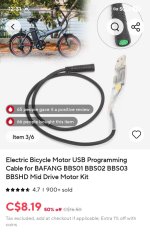
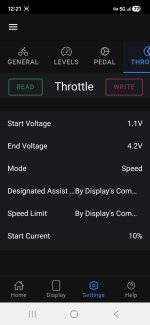
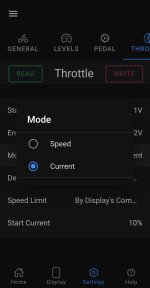
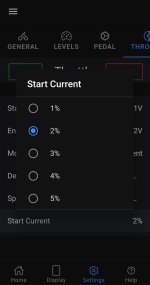
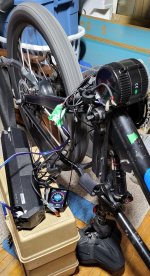
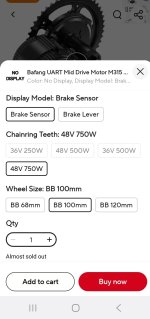
I just bought a UART Bafang 750W mid-drive before it becomes extinct and managed to get it up and running and turned down easily with my Samsung phone, a programming cable, and the Speeed App in less than ten minutes.

Thanks @Gionnirocket

I thought I might have to buy a computer to turn it down.

Will the Speeed App be monitoring my progress and reporting back to the mother-ship ? 😁
 

Attachments

  • Screenshot_20251222_123105_AliExpress.jpg
    Screenshot_20251222_123105_AliExpress.jpg
    167.2 KB · Views: 7
  • Screenshot_20251222_124307_Speeed.jpg
    Screenshot_20251222_124307_Speeed.jpg
    55.1 KB · Views: 6
  • Screenshot_20251222_122154_Speeed.jpg
    Screenshot_20251222_122154_Speeed.jpg
    73.5 KB · Views: 6
  • Screenshot_20251222_122310_Speeed.jpg
    Screenshot_20251222_122310_Speeed.jpg
    63.4 KB · Views: 6
  • Screenshot_20251222_122341_Speeed.jpg
    Screenshot_20251222_122341_Speeed.jpg
    59.7 KB · Views: 7
  • 20251213_133755.jpg
    20251213_133755.jpg
    460.6 KB · Views: 7
Last edited:
There's not much available with a 100 mm bottom bracket and I couldn't find a 500w UART version.

Now I own a shitty shitty bafang bafang 😁

Screenshot_20251222_131419_DuckDuckGo.jpg
 

Attachments

  • Screenshot_20251222_130038_Gallery.jpg
    Screenshot_20251222_130038_Gallery.jpg
    104.5 KB · Views: 4
Last edited:
FWIW,..

I just bought a UART Bafang 750W mid-drive before it becomes extinct and managed to get it up and running and turned down easily with my Samsung phone, a programming cable, and the Speeed App in less than ten minutes.

Thanks @Gionnirocket

I thought I might have to buy a computer to turn it down.

Will the Speeed App be monitoring my progress and reporting back to the mother-ship ? 😁

You're dangerous on the dance floor!

image001.gif
 
missing Ahicks!

Yeah me too
I remember frustrating the Hell outta him.

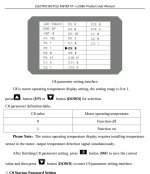
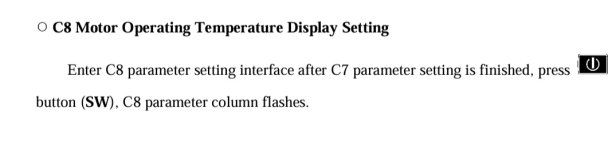
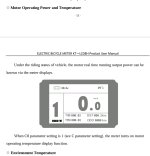
Why would a KT display be able to show you the motor temperature if a KT motor doesn't have a thermometer?


They updated the user manual with a "Note" but it doesn't tell you that it needs to be seperately wired in as well.

And I think it has to go all the way to the display on the handlebars and be soldered in to the empty solder points on the circuit board in the display?
 

Attachments

  • Screenshot_20251222_150508_Adobe Acrobat.jpg
    Screenshot_20251222_150508_Adobe Acrobat.jpg
    213 KB · Views: 7
  • Screenshot_20251222_150430_Adobe Acrobat.jpg
    Screenshot_20251222_150430_Adobe Acrobat.jpg
    46.5 KB · Views: 7
  • Screenshot_20251222_150259_Adobe Acrobat.jpg
    Screenshot_20251222_150259_Adobe Acrobat.jpg
    127 KB · Views: 7
Back