Charger timer?

John Bowman

Member
Region
USA
Hope this is right place to post.
The common advice seems to be unplug charger after battery is at 95% to 100%, or charger light is green.
I am not always around monitoring the charger. What about if I put a timer on the wall plug, and plugged charger into that? Set timer for 3 hours or whatever?
Good idea or not?
If yes, any advice on appropriate timer? Charger rated at 2 amp.
 
Last edited:

Shouldn’t be a problem as long as you get a quality timer that can handle the load. I have one on my swimming pool pump that turns it on for ten hours each night when the power is cheaper, and that draws 9 amps.

Its been working for about twenty years now.
 
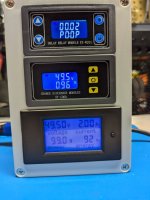
I've put together several of these....

PXL_20241103_185848111.jpg
Charge to any SOC you desire from any starting point and also has a built in timer as a secondary shutdown.
Since it disconnects the load afterwards, there's no vampire discharge if left connected. Add a home automation outlet and you can set it to start anytime or on demand with the app.
 
Last edited:
I use a Wi-Fi smart plug. When you ride enough, you start to get sense about how long it roughly takes to get to a target percentage. When I’m commuting regularly, I start the charge at 4:45 AM and I know that by the time I leave at 6 AM, my battery is at a sufficient state of charge.
 
I use a digital timer that I picked up from Amazon, my Bosch battery recharges at the rate of 20%/hour, making it easy to set the charge time.
 
These TP_Link Tapo Outlets work well and are very easy to set up. You can set up any type of Schedule or timer On/Off/ desired and are easily monitored and controlled by a smart phone. You can turn them On locally and they'll run what ever you have set up. I find them a lot more versatile than a stand alone mechanical timer outlet.
 
I've had problems with many electronic and mechanical timers over the years. Once in a great while, one will fail to turn off. We get frequent power surges & outages here and they can mess up some timers. If I'm not nearby to check on the charge cycle, I've gotten in the habit of using the timers in tandem. I'll plug the electronic timer into the mechanical one and set both for the charge time I want. Overkill maybe, but it gives me some peace of mind.
 
Like I mentioned the DIY Smart Charge Adapter that I put together has some redundancy built in with two shut down settings of SoC and time. Then when fed by the Tapo outlet that adds a separate 3rd shutdown with another timer. But at the end of the day even if they all failed On you would still have the charger and battery full charge shut downs to protect from over charging which is what the majority of the charging world does.
I even have an old low_res webcam in the room so I can check the status without having to go downstairs. So I'm not paranoid about charging but I do like to tinker and mess with tech... and my added devices go way beyond NASA requirements for this task 🙃
 
I use a TP-Link Tapo Smart Plug that has energy monitoring. It has a function called Charge Guard that monitors the amount of energy being drawn. I have it set so that five minutes after the power draw drops below 5 watts (much less than when the battery is charging), the plug shuts itself off. It also has a Power Protection function that powers the plug off when the current draw exceeds a selectable limit, which will be useful if something goes wrong and the battery starts drawing excessive power. The plug is rated for 15A/1800 watt max power draw, so plenty enough for battery charging.
 
I use a TP-Link Tapo Smart Plug that has energy monitoring.
I use the same setup, but primarily use the timer function to turn off charging at 80%, unless going for long rides. (2 x 500Wh onboard batteries)

In addition, I have a TP-Link temperature and humidity sensor sitting on the 6A charger which automatically turns charging off if unit gets too hot (on hot days). I set the threshold temperature.
 
A timer on any charger is always a good idea. I use them on my cordless tool battery chargers as well as those for my bike batteries.
Be aware that some inexpensive chargers can slowly discharge the battery if the DC side is left connected.
I have a digital stopwatch on a lanyard. I hang it around my neck when I need to remember to do something. Its presence reminds me, and the reading tells me if it's time.

B&D 20V NiCD chargers were made to drain batteries, powered or not. NiCDs had a problem. If a charger kept them topped off, dendrites would grow, causing self discharge that increased until the cell was shorted. B&D solved the problem with chargers that would drain milliamps until the voltage dropped enough to trigger the charger to top it off.

Then they switched to NiMH. The charger would drain milliamps but wouldn't come on to top off NiMH. If you came back a week later, the light would say the battery was charged, but it would be dead. That's one way to get customers to keep replacing batteries or chargers, or switch to a "better" brand made by the same parent company.
 
The common advice seems to be unplug charger after battery is at 95% to 100%, or charger light is green.
Maybe totally useless info but the Specialized app lets you set the charge to 80%. Every 10 times it charges to 100%. Initially I thought the selection of an 80% limit was kind of arbitrary, but my new Samsung Galaxy Ultra also has the ability to limit the charge to 80%. Not sure why they think 80% is optimum for battery life.
 
Maybe totally useless info but the Specialized app lets you set the charge to 80%. Every 10 times it charges to 100%. Initially I thought the selection of an 80% limit was kind of arbitrary, but my new Samsung Galaxy Ultra also has the ability to limit the charge to 80%. Not sure why they think 80% is optimum for battery life.
In terms of longevity, the optimal charge voltage is 3.92V/cell. Battery experts believe that this threshold eliminates all voltage-related stresses; going lower may not gain further benefits but induce other symptoms

3.92v/cell is approximately 80%

(See BU-808b: What causes Li-ion to die?)
 
The only issue I have with charging to 80% is, it can lead to an increase in the number of charge cycles . Not sure which is more harmful, charging to 100% or charging more frequently.
 
My approach is this....the battery seems to be most stable at its storage charge, typically between 40 - 60%
So I work out from there in use cheating to the higher SoC for practicality.
So if that 20% isn't enough for a ride I'll go 40 - 80%  ... Then 35 - 85% and so on moving in both directions.
I don't stress about it at all, but if the ride is known it becomes second nature on what's needed.
As long as you slow charge I don't think more charges stress the battery. And a 40 to 80% charge I don't believe is considered a full charge cycle so it's only chipping away at the total number of cycles one will have with a particular battery.

yVmv
 
The only issue I have with charging to 80% is, it can lead to an increase in the number of charge cycles .
I'm sure that would have been considered in the 80% recommendation.

On my ebike, charging from, say, 20% to 80% is recorded as 60% of a full charge cycle.

Additionally, I would expect that charging to 80% involves less heat stress.
 
Last edited:
Back